Burst Pro Specs, Features, and Value: Is it worth the price tag?
In the rapidly evolving landscape of competitive gaming peripherals, the quest for the ultimate lightweight mouse has led manufacturers down many different design paths. Some have embraced the "cheese grater" aesthetic, leaving the internal components of their devices exposed to the elements via a honeycomb of cut-outs. Others have maintained a traditional solid shell, often at the cost of added grams. The Burst Pro enters this arena as an intriguing middle ground, promising the weight savings of a honeycomb design with the structural integrity and cleanliness of a solid-shell mouse. This article provides an in-depth analysis of its technical specifications, real-world utility, and overall value proposition for modern gamers.
The Lightweight Engineering Philosophy
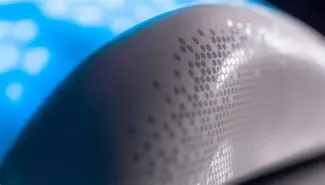
The primary draw of the Burst Pro is its "Bionic Shell." Unlike many of its competitors, such as the Glorious Model O or the Cooler Master MM711, the Burst Pro does not leave its internal honeycomb structure open. Instead, it features a translucent, solid outer layer that covers the hex-patterned frame. This design choice serves two main purposes: it prevents dust and skin oil from accumulating inside the mouse—a common complaint for honeycomb users—and it provides a unique canvas for RGB lighting. At approximately 68 grams, it sits comfortably in the "ultra-light" category, making it an ideal candidate for FPS (First-Person Shooter) titles where rapid flicks and low-latency movements are paramount.
For the buyer who prioritizes durability, this solid-yet-light approach is a significant selling point. Many lightweight mice feel flimsy or creak under the pressure of a intense grip during a high-stakes match. The Burst Pro, however, maintains a rigidity that belies its weight. The symmetrical ergonomic shape is designed to accommodate a variety of grip styles, though it leans heavily toward claw and fingertip users due to its relatively flat profile and pronounced rear hump.
Core Specifications and Technical Prowess
Beyond the shell, the internal components of a gaming mouse determine whether it lives up to its "Pro" moniker. The Burst Pro is equipped with the Owl-Eye optical sensor, a custom iteration of the highly-regarded PixArt PMW3389. This sensor offers a maximum sensitivity of 16,000 DPI and a tracking speed of 400 IPS (inches per second), ensuring that even the fastest hand movements are translated into smooth, jitter-free cursor paths on the screen.
Perhaps the most revolutionary inclusion, however, is the implementation of optical switches rather than traditional mechanical ones. The Titan Switch Optical utilizes a light beam to register clicks, effectively eliminating the need for a physical metal contact. This technology offers two distinct advantages: it is significantly faster than mechanical switches because there is no need for a "debounce delay," and it is far more durable, with a lifespan rated at approximately 100 million clicks. For competitive players, the near-instantaneous response time can be the difference between a winning "frag" and a trip back to the respawn screen.
Technical Specifications Overview
| Feature | Burst Pro Specification |
|---|---|
| Sensor Type | Roccat Owl-Eye Optical (PixArt 3389 base) |
| Maximum DPI | 16,000 DPI |
| Switch Type | Titan Switch Optical (100M Click Life) |
| Weight | 68 grams (approx. 2.4 ounces) |
| Cable Type | PhantomFlex Braided Cable (1.8m) |
| Feet Material | Heat-treated Pure PTFE |
| Polling Rate | 1,000 Hz / 1ms |
| Number of Buttons | 6 Programmable Buttons |
Real-World Performance: Tracking and Gliding
Specs on a box are one thing, but how the mouse performs on a desk is what actually matters to the end user. One of the standout features of the Burst Pro is its feet. Most premium mice come with PTFE (Teflon) glides, but the Burst Pro uses heat-treated pure PTFE glides. By pre-treating the feet, the manufacturer has smoothed out the micro-imperfections that usually make a brand-new mouse feel slightly "scratchy" or inconsistent during the first few hours of use. Right out of the box, the Burst Pro offers an exceptionally smooth glide that mimics the feel of a mouse that has been "broken in" for weeks.
Discover deals on Electronics — updated daily.
Shop Amazon →This smoothness is complemented by the PhantomFlex cable. While wireless mice have become the standard for high-end play, they remain expensive and require charging. The PhantomFlex is a braided cable designed to be so light and flexible that it "disappears" during use. In testing, the cable creates minimal drag, even without a dedicated mouse bungee. For players who want the reliability of a wired connection without the tethered feel of traditional rubber cables, this is a top-tier implementation.
Pros and Cons
Every piece of hardware involves trade-offs. While the Burst Pro is high-performing, it caters to a specific type of user and may not be the perfect fit for everyone.
- Pro: Optical Switch Longevity – The move away from mechanical parts means the common "double-click" issue that plagues many high-end gaming mice is virtually impossible here.
- Pro: Dust-Resistant Lightweight Design – You get the benefit of a 68g mouse without having to worry about spilling a drink or collecting dust inside a hollow chassis.
- Pro: Superior Out-of-the-Box Glide – The heat-treated feet are objectively better than standard glides, saving users the effort and cost of buying third-party replacements.
- Pro: Vivid AIMO Lighting – The translucent shell creates a unique "inner glow" effect that is more aesthetically pleasing and diffuse than typical exposed RGB LEDs.
- Con: Symmetrical Shape Limitations – While comfortable for most, fans of truly ergonomic, right-hand-contoured designs (like the Kone series) may find the symmetrical sides a bit less supportive.
- Con: Side Grip Texture – The sides of the mouse feature a hexagonal texture molded into the plastic rather than rubberized grips. If your hands get particularly sweaty during gaming, the plastic can feel slippery.
- Con: Software Complexity – The proprietary software used to customize the 16.8 million color options and DPI stages can be somewhat overwhelming for casual users compared to more minimalist alternatives.
Buying Guide: Who is this for?
Determining if the Burst Pro is worth its price tag depends largely on your gaming habits and physical preferences. It is priced as a mid-to-high-tier wired gaming mouse, usually competing in the $50 to $60 USD range. At this price point, you are paying for the technical precision of the sensor and the innovation of the optical switches.
The FPS Enthusiast
If you primarily play fast-paced shooters like Counter-Strike, Valorant, or Apex Legends, the 68g weight and 16,000 DPI sensor make this an easy recommendation. The lightweight nature reduces wrist fatigue during long sessions, and the high-end sensor ensures that your aim is limited only by your skill, not the hardware.
The Efficiency-Minded Worker
While marketed for gaming, the Burst Pro is surprisingly effective for office work. The lightweight movement reduces the strain of moving a cursor across multiple large monitors. Furthermore, the programmable buttons can be bound to macros or shortcuts in professional software like Photoshop or Excel, making it a versatile tool for productivity.
The "Claw Grip" User
Because the mouse has a relatively high hump toward the rear, it nests perfectly into the palm of a claw or fingertip gripper. If you have "large" hands and prefer a full palm grip where your entire hand rests on the mouse, you might find the 120mm length a bit short, and may want to look toward larger ergonomic models instead.
Discover deals on Electronics — updated daily.
Shop Amazon →The Comparison: Burst Pro vs. Burst Pro Air
Prospective buyers should note that there is a wireless version titled the Burst Pro Air. The wireless model offers the same shape and optical switch technology but adds Bluetooth and 2.4GHz wireless connectivity. However, the wireless version is roughly 12 grams heavier (80g vs 68g) to accommodate the battery and is significantly more expensive. For the purist who wants the absolute lowest weight and doesn't mind a cable—especially one as flexible as the PhantomFlex—the wired Burst Pro remains the better value and performance choice.
Is it Worth the Price Tag?
When assessing value, we have to look at the competition. Many mice at the $30-$40 range offer decent sensors but cut corners on cable quality, feet, and switches. Conversely, "luxury" mice targeting the $100+ range often include features like OLED screens or weights that many competitive players don't actually want. The Burst Pro hits a "sweet spot." It strips away the gimmicks and focuses entirely on the three things that matter most in a gaming mouse: sensor accuracy, click reliability, and movement fluidity.
The inclusion of 100-million-click optical switches alone justifies much of the cost, as it effectively extends the functional life of the mouse far beyond its mechanical competitors. When you add in the fact that you won't need to purchase aftermarket PTFE feet or a paracord-style cable to get the best experience, the out-of-the-box value becomes even more apparent.
Conclusion
The Burst Pro is a refined, highly functional piece of electronics that successfully carves out a niche in a crowded market. By addressing the primary weaknesses of the honeycomb trend—structural fragility and dust accumulation—without sacrificing the benefits of low weight, it offers a compelling package for serious gamers. While the software could use a bit more polish and the lack of rubber side grips might be a minor deterrent for some, the core performance is undeniable. For anyone looking for a reliable, high-performance wired mouse that balances modern innovation with practical durability, the Burst Pro proves itself to be well worth the investment.